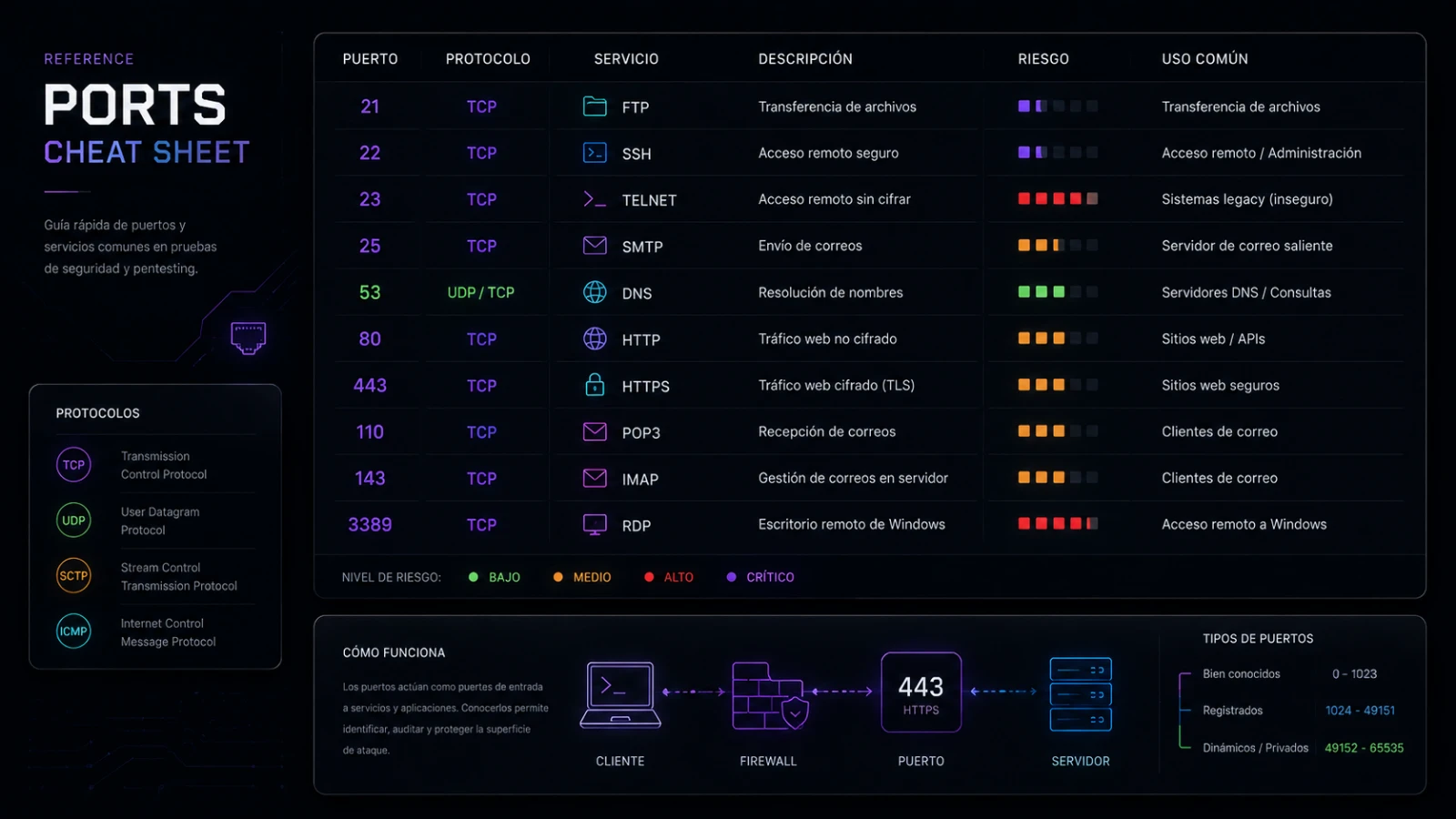
Common ports, worth memorising.
You do not need all 65,535. You need the two dozen that come up constantly. Here they are, grouped by what they do and why they matter on an assessment.
Port numbers are how a machine knows which service a packet is for. There are 65,535 of them per protocol, but in practice a small set accounts for the overwhelming majority of what you meet — reading an nmap result, writing a firewall rule, or triaging traffic. Memorise these and most scans become readable at a glance. The authoritative list is maintained by IANA; this is the practitioner's short version.
Web and remote access
The ports you will see on almost every host that does anything useful:
| Port | Service | Why it matters |
|---|---|---|
| 80 / TCP | HTTP | Unencrypted web. Seeing it open invites a look at what is served, and whether it should be HTTPS instead. |
| 443 / TCP | HTTPS | Encrypted web. The default for anything public today; its certificate is itself a source of recon. |
| 22 / TCP | SSH | Encrypted remote shell on Linux/Unix. A prime target for credential attacks — watch its auth logs. |
| 3389 / TCP | RDP | Windows Remote Desktop. Frequently exposed by mistake and heavily targeted; rarely belongs on the internet. |
| 23 / TCP | Telnet | Unencrypted remote shell. Effectively obsolete — its presence is a finding in itself. |
| Port | Service | Why it matters |
|---|---|---|
| 25 / TCP | SMTP | Mail transfer between servers. Misconfiguration enables open relays and spoofing. |
| 587 / TCP | SMTP (submission) | Mail submission from clients, with authentication. The modern send path. |
| 993 / TCP | IMAPS | Encrypted mailbox access. What a mail client uses to read mail securely. |
| 110 / TCP | POP3 | Older mailbox retrieval. Still around; prefer its encrypted variants. |
Infrastructure and databases
Ports that reveal what a machine is really doing — and which you should almost never see exposed to the public internet:
| Port | Service | Why it matters |
|---|---|---|
| 53 / TCP+UDP | DNS | Name resolution. UDP for queries, TCP for large responses and zone transfers. |
| 3306 / TCP | MySQL/MariaDB | Database. Exposed to the internet is a classic critical finding. |
| 5432 / TCP | PostgreSQL | Database. Same rule — should sit behind the app, never facing the world. |
| 445 / TCP | SMB | Windows file sharing. Historically the blast radius for network-wide worms; keep it internal. |
| 3389 / TCP | RDP | Repeated here as a reminder: if it faces the internet, treat it as an incident waiting to happen. |
How to actually remember them
Do not try to memorise the table cold. Three habits make them stick:
- Group by role, not by number. "Web" (80/443), "remote access" (22/3389), "mail" (25/587/993), "data stores" (3306/5432). Recall is easier by function.
- Learn the pairs. Many services come as plaintext + encrypted: HTTP/HTTPS (80/443), IMAP/IMAPS. Learning the pair fixes both.
- Read real scans. Run nmap against your own lab hosts and the numbers attach themselves to services you can see. Repetition in context beats flashcards.
Well-known, registered, and dynamic
Ports fall into three ranges, and knowing which is which explains a lot of what you see on a scan:
- Well-known ports (0–1023) are reserved for core services — everything in the tables above lives here. On Unix-like systems, binding to one of these requires elevated privilege, which is itself a small security property: a service on port 80 was started by something with root-level rights.
- Registered ports (1024–49151) are assigned to specific applications by IANA but do not need special privilege — databases like MySQL (3306) and PostgreSQL (5432) sit here.
- Dynamic / ephemeral ports (49152–65535) are what your machine picks at random for the client side of a connection. When you browse a website, your end of the conversation is on an ephemeral port; the server's end is on 443. Seeing lots of high-numbered ports in a connection list is normal, not suspicious.
This is also why "the port tells you the service" is only a convention. The mapping is a default, enforced by nobody: an administrator can put SSH on 2222 or run a web server on 8080. A good scanner does not just read the port number — it fingerprints the service actually answering, which is why nmap -sV exists.
One caveat worth internalising: a service can run on any port. Finding SSH on 22 is convention, not a rule — an administrator can move it to 2222 or anywhere else, and attackers sometimes hide services on unexpected high ports precisely because people only glance at the well-known ones. The numbers here are the defaults you will meet most often, and knowing them cold is exactly what lets the exceptions jump out at you when they appear.